top of page

Instructions for downloading the application

In this short section, we will show you how to download and log in to our app.

1.

Download the Wix Spaces app to your mobile phone.

2.

After downloading the application, click on the text "Do you have an invitation code?" and enter the code displayed by us to allow entry into our application.

Code:

F2NSYM

3.

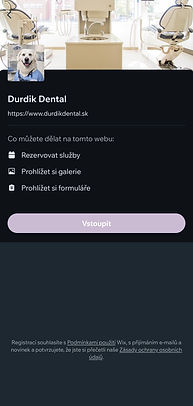
After entering our application, create an account under which you will appear.

Please note: If you already have an account on our site, please use the same email address you use to log in to our site. If you use a different email address, you will not see your reservation in the app.
IMG_8579.PNG
IMG_8580.PNG

4.

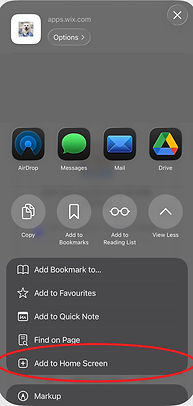
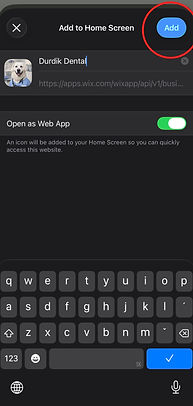
Done, and you're done! If you want to go one step further, you can add us directly to your home screen. See below for instructions.

5.

follow the instructions in the pictures.

(what needs to be clicked is always marked in red)

IMG_8581.PNG
IMG_8582.PNG
IMG_8583.PNG
IMG_8584.PNG
IMG_8585.PNG
IMG_8587.PNG
IMG_8588.PNG
IMG_8589.PNG

Durdík Dental
dental clinic

Our address:

Email: recepcia@ddental.sk

Tel: 0917 771 661 (od 16:00 do 18:00)

DDental s.r.o.

Škultétyho 660/9

Nové Mesto nad Váhom

​915 01

  • Instagram
  • Facebook

We treat patients only after prior appointment.
(also applies to emergency services)

OPENING HOURS

After: according to order

Tue: by order

Wed: according to order

Thu: according to order

Fri: 4:00 PM - 8:00 PM

Sat: 9:00- 15:00

No: according to order


OPENING HOURS

After: according to order

Tue: by order

Wed: according to order

Thu: according to order

Fri: 4:00 PM - 8:00 PM

Sat: 9:00- 15:00

No: according to order


contact form

© 2026 DDental sro by Wix

bottom of page